Knewton Certificate Authority
The Knewton Certificate Authority or Knewton CA is an internal OpenSSL certificate authority that can be used to generate and sign SSL keys and certificates for internal use at Knewton. This allows users to easily request and deploy custom secure certificates for their internal knewton services and web tools.

This is due to the segregation of certificates. If one certificate is compromised, the rest remain secure. This means we can isolate security incidents to a regional and even a service level.

Self signed internal certificates do not require purchasing from an external CA. At $200/yr per certificate these add up quick. The savings is thousands per year.

Getting a certificate for your service is as easy as contacting Security. Let us know the desired URL or Common Name and let us do the rest. You will receive a certificate chain and key file within minutes via LastPass.

Because security will be distributing the certificates, we will know and notify you when they are set to expire. This means less time debugging SSL problems.

When you navigated to this page if you DID NOT RECEIVE ANY WARNINGS you are likely all set.
Verify that your address bar looks like the examples below. If it does, you are ready to go!
If not, or you were given a certificate warning, scroll down to and follow 'Install the Knewton CA Cert.'
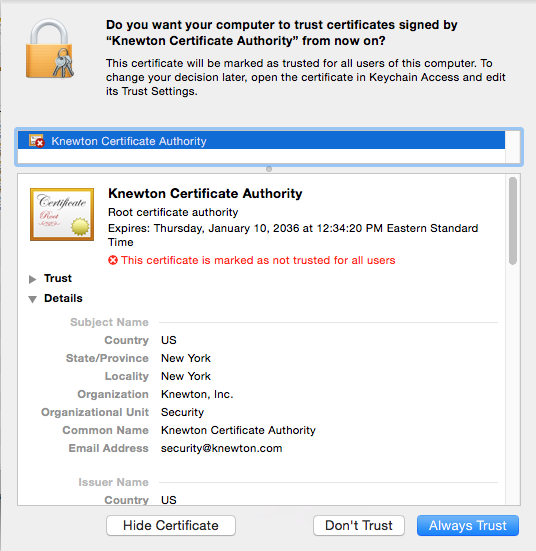
Once you have downloaded the certificate, simply open the file, select 'Always Trust' and type your password to allow OSX to add the certificate to your keychain.
Then you're all set!
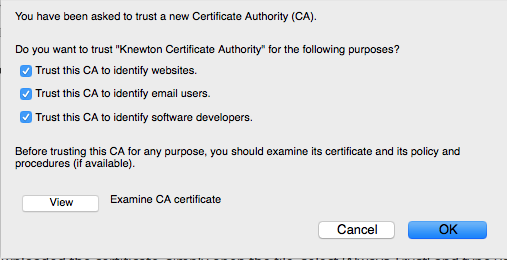
Firefox users will need to install the certificate to Firefox seperately by checking all boxes in the browser popup. 
Once this is complete, right click on the above link and click 'Save Link As...' Once saved, double click the downloaded certificate and install to the OS as described above.
The following instructions are for installing the Knewton Root CA via your Mac Terminal. If you have another operating system or none of these instructions do not work for you, please contact security.
1. Open the Terminal
2. Run the following commands:
curl -o /tmp/knewton-ca.crt http://knewton-public.s3.amazonaws.com/knewton-ca/knewton-ca.crt
sudo security add-trusted-cert -d -r trustRoot -k /Library/Keychains/System.keychain /tmp/knewton-ca.crt
3. Visit this page again (you may need to close and open the browser)
The Root Certificate is installed on all ansible deployed ec2 instances under the security tag in the base role. You may need to re-provision if the instance was deployed prior to 2016/01/21.
The Root Certificate will be included in the base docker images in the coming weeks. More updates to follow.